
System & Docker
Monitor local and remote computers, inspect process trees and network connections, and control the services and containers running on them. Move between a network endpoint and its owning process without losing the selected computer.
Inspection
Resource monitoring and thresholds
Monitor CPU, memory, and disk use across selected computers, with configurable history and warning thresholds for high CPU, high memory use, and low disk space.
View a single computer, a group or all monitored machines. Changing the selected computer does not stop background monitoring for the others.
Poll every 2, 4, 10, or 30 seconds, or refresh manually. Response timeouts and history retention are configurable separately.
Monitor network connections and their owners
Inspect protocol, connection state, local and remote addresses, ports, program names and process IDs. Filter active TCP connections separately from listeners, include UDP endpoints, and search by address, port, process name or command line.
Open an endpoint’s owning process directly in the Processes view. In the other direction, show all connections for a selected process; this applies an exact process filter across connection states and includes UDP.
The owning process can be terminated when supported by the connection and account permissions. This ends the process and all its connections, rather than closing a single socket.

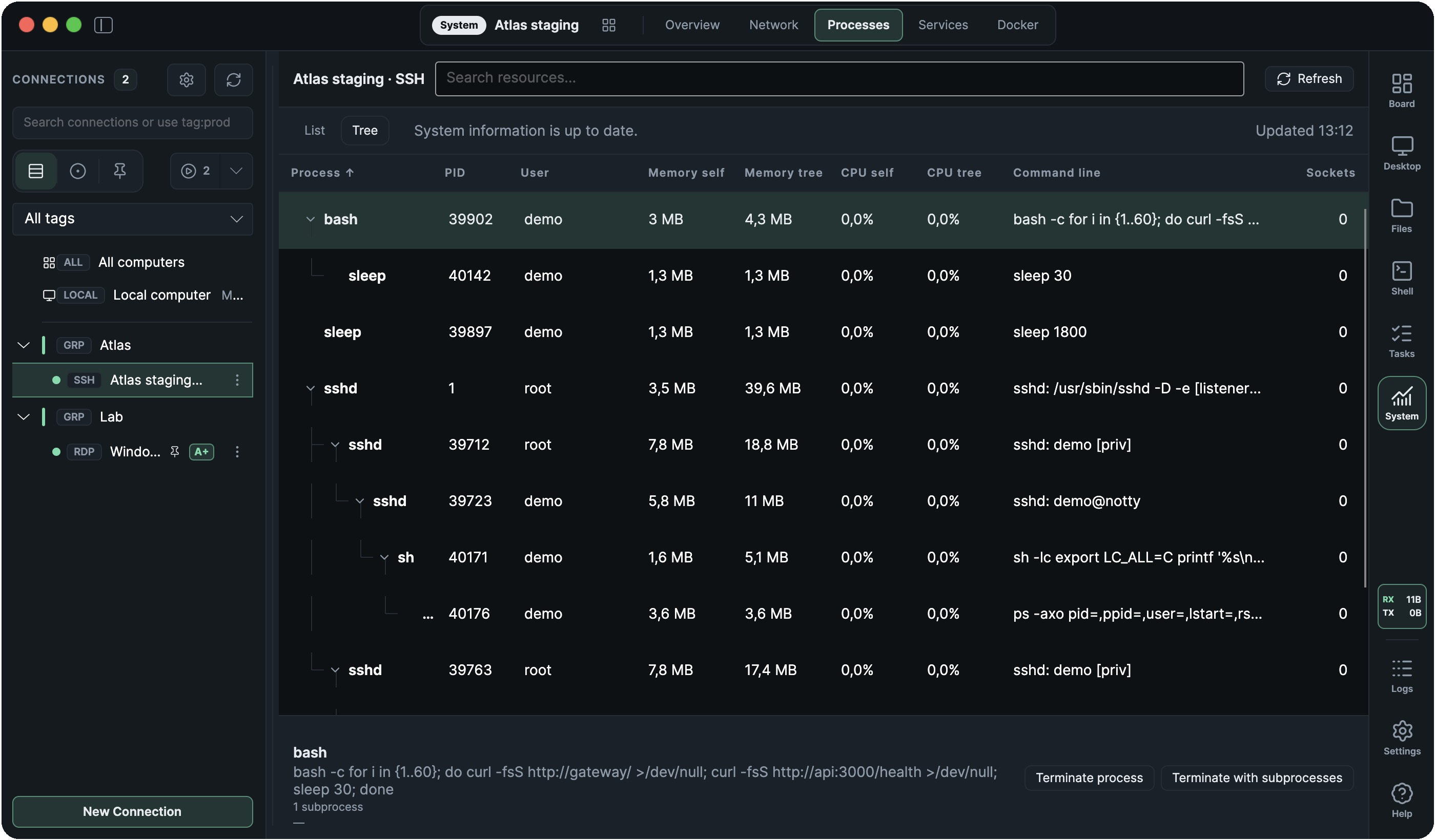
Process lists, parent–child trees and termination
Switch between a flat process list and a tree showing parent and child processes. Expand or collapse branches to inspect how a program’s subprocesses relate to one another.
Compare CPU and memory for a process on its own or for its entire subtree. Sort by either value to find the programs consuming resources across several subprocesses. Partial totals are marked when the system cannot report every process.
Inspect process memory use and command lines, including the owning user, related services, and network-connection counts. Search also accepts process IDs, addresses, and service names.
Terminate a single process or include its subprocesses. The confirmation supports force termination where available; known critical processes and the Ramux agent are protected. Available actions depend on the target system and account permissions.
Management
Windows Services, systemd, and launchd
Start, stop, and restart services on Windows, Linux, and macOS. Enable or disable automatic startup where supported by the service manager.
Inspect service state, startup configuration, and the associated process. Available operations follow the target service manager and account permissions.
Docker & Compose
Manage containers, images, volumes, networks and Compose projects on local computers, over SSH or through the RDP agent.
- Inspect CPU, memory and network I/O, published ports, mounts and complete resource configuration.
- Create containers with environment variables, mounts, networks and resource limits; start, stop, restart, pause or resume them.
- Pull and tag images, create volumes and networks, and connect or disconnect containers from networks.
- Deploy Compose projects from files on the selected computer; pull, start, stop or tear down a project.
- Follow container logs and open an interactive container shell.
- Select an explicit Docker context for inventory, actions and shells.

Docker requirements
The target computer needs the Docker CLI and the connected user needs access to the daemon. Compose actions require the original Compose files on that computer. Local integrated container shells require macOS; agent command terminals require Windows ConPTY.
Local, SSH, and RDP access
System operations run locally, over supported SSH connections, or through the Ramux agent in an active RDP session.
SSH service actions requiring sudo need non-interactive authorization. RDP actions use the agent’s permissions; administrator operations require an elevated agent in the connected Windows user’s session.